You're in the middle of an important video call when suddenly the audio cuts out, the video freezes, and everyone's talking over a garbled connection. Or perhaps your team's cloud apps crawl to a halt right when they need them most. These frustrating slowdowns often point to one culprit: network congestion.
Understanding what causes network congestion – and how to fix it – can mean the difference between a network that supports your business and one that constantly gets in the way. In this guide, we'll explain what network congestion is, cover common causes, and walk through practical network congestion solutions you can implement today.
What Is Network Congestion?
Network congestion occurs when a network node or link carries more traffic than it's designed to handle. As a result, data packets get lost in transit, resulting in slowdowns, delays, and dropped connections.
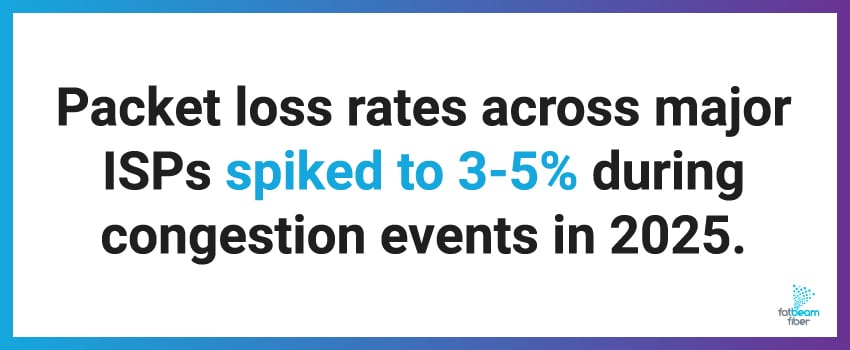
Packet loss rates across major ISPs averaged less than 1% globally in 2025, but spiked to 3-5% during network congestion events.1 That spike in packet loss during congestion is what impacts user experiences.
What Causes Network Congestion?
There are several factors that contribute to internet congestion, which often compound to create cascading performance problems. The most common issues are:
Insufficient Bandwidth
Available capacity gets stretched thin when more devices and users compete for the same connection. What felt adequate three years ago might now be completely insufficient for your current operations – so if your network is suffering from frequent performance issues, it might be time to upgrade your bandwidth plan.
Too Many Connected Devices
Every smartphone, laptop, smart TV, and IoT device consumes bandwidth. When dozens of devices operate simultaneously, especially during peak hours, they can overwhelm a connection.
Non-Business Traffic
Streaming services, software updates, and unsolicited traffic can eat up bandwidth and crowd out traffic that matters. This is particularly problematic when employees are streaming video during business hours or when security camera footage is uploading continuously in the background.
Network Equipment Limitations
Outdated routers, switches, or network cards can't process traffic efficiently, creating bottlenecks even when overall bandwidth seems sufficient. Your router may have been cutting-edge five years ago, but it’s likely incapable of handling modern traffic volumes today.
Poor Network Configuration
Without proper traffic prioritization, all data – whether a critical video call or a routine backup – competes equally for resources, leading to inefficient bandwidth use.
Can Wi-Fi Signals Get Congested?
What is Wi-Fi congestion, exactly? Wi-Fi congestion happens when too many devices or nearby networks compete for the same wireless channels, degrading performance for everyone using that spectrum.
A few common signs of Wi-Fi congestion include:
- Slow speeds despite a fast internet plan,
- Connections that work fine on Ethernet but lag on Wi-Fi
- Inconsistent performance that varies by time of day or location within a building
In apartment buildings, office parks, and dense neighborhoods, dozens of Wi-Fi networks often overlap on the same channels. Add multiple connected devices within a single household or business, and you have a recipe for constant wireless slowdowns – separate from any issues with your actual internet connection.
3 Network Congestion Management Tips
Effective network congestion management requires ongoing monitoring and planning to prevent problems before they happen. Here are some tips to help simplify your congestion management:
1. Monitor Traffic Patterns
Knowing when and how congestion happens across your network can help you address root causes rather than just symptoms. Network monitoring tools reveal which applications, devices, or times of day create the most strain on your infrastructure.
For example, you might discover that your backup process runs at 8 AM and conflicts with morning video meetings, or that your security cameras upload at the same time your staff needs to access cloud files. Visibility lets you make smarter decisions about when to run non-critical traffic.
2. Plan for Growth
Your bandwidth needs today won't match your needs in two years. Building headroom into your network design prevents congestion from becoming a constant problem as your company grows.
Enterprise network traffic needs will grow by a projected 27% through 2026,1 which means what feels adequate now could hold your teams back next year if you're not planning ahead.³
3. Improve Infrastructure
Sometimes the best way to reduce network congestion is addressing the underlying technology. Fiber internet connections offer much more capacity than cable or DSL, as they offer dedicated bandwidth that isn't shared with neighboring businesses or households.
Fatbeam’s Wavelength services provide businesses with dedicated, high-capacity fiber connections specifically designed to handle even your most demanding traffic loads – all without the congestion issues common on shared networks.
![Enterprise network traffic needs will grow by 27% through 2026.]](https://www.fatbeamfiber.com/hs-fs/hubfs/Blog/2026/What%20Is%20Network%20Congestion%20Common%20Causes%20How%20To%20Fix%20Them/fatbeam-blog-whatisnetworkcongestion-inline3.jpg?width=850&height=350&name=fatbeam-blog-whatisnetworkcongestion-inline3.jpg)
How To Fix Network Congestion: Practical Solutions
Once you've identified congestion as your problem, there are several network congestion fix strategies you can try to restore performance and prevent it from happening again.
- Upgrade Your Bandwidth: If your usage has genuinely outgrown your plan, the most direct fix is upgrading to higher-capacity internet service. At Fatbeam, our Dedicated Internet Access solutions provide businesses with guaranteed, uncontested bandwidth that scales from 100 Mbps to 100 Gbps.
- Implement Quality of Service (QoS): QoS settings allow you to control network traffic by prioritizing business-critical applications over less important data. Video calls and VoIP systems can receive priority treatment, while routine backups wait their turn.
- Segment Your Network: Separating traffic into different segments – guest Wi-Fi, IoT devices, and primary business systems – prevents less important traffic from competing with critical operations.
- Remove Unnecessary Traffic: Identify and address unneeded traffic consuming your bandwidth, such as restricting streaming during business hours or removing unused devices.
- Change Your Wi-Fi Channel: For wireless congestion, switching over to a less crowded channel can help improve performance in areas with too many overlapping networks.
Some of these are quick fixes you can implement immediately, such as changing your Wi-Fi channel or removing unused devices. Others require longer-term planning, like upgrading your equipment or increasing your bandwidth capacity. The key is understanding exactly where your congestion is coming from.
Build a Congestion-Free Network With Fatbeam
Most businesses assume choppy calls and slow applications are just the price of doing business. They're not. Once you understand what's actually causing your congestion – whether it's bandwidth limitations, aging equipment, or Wi-Fi interference – you can fix it decisively.
At Fatbeam, we've built our fiber network across the Western U.S. specifically to help businesses avoid the congestion issues that plague shared infrastructure. Our Dedicated Internet Access and Wavelength services deliver bandwidth that doesn’t compete with other subscribers, so you get consistent performance regardless of neighborhood demand.
Ready to eliminate network congestion for good? Contact Fatbeam today to get started.
Sources: